
Debtica Module
Report
Report workflows and analytics without manual chasing.
Report
Where it fits
Use Report when recurring reports, assigned submissions or organisation-level obligations need a clear submitter-to-receiver workflow and reviewable analytics.
Clear due dates
Submission visibility
Comparable indicators
Module view
Report product view
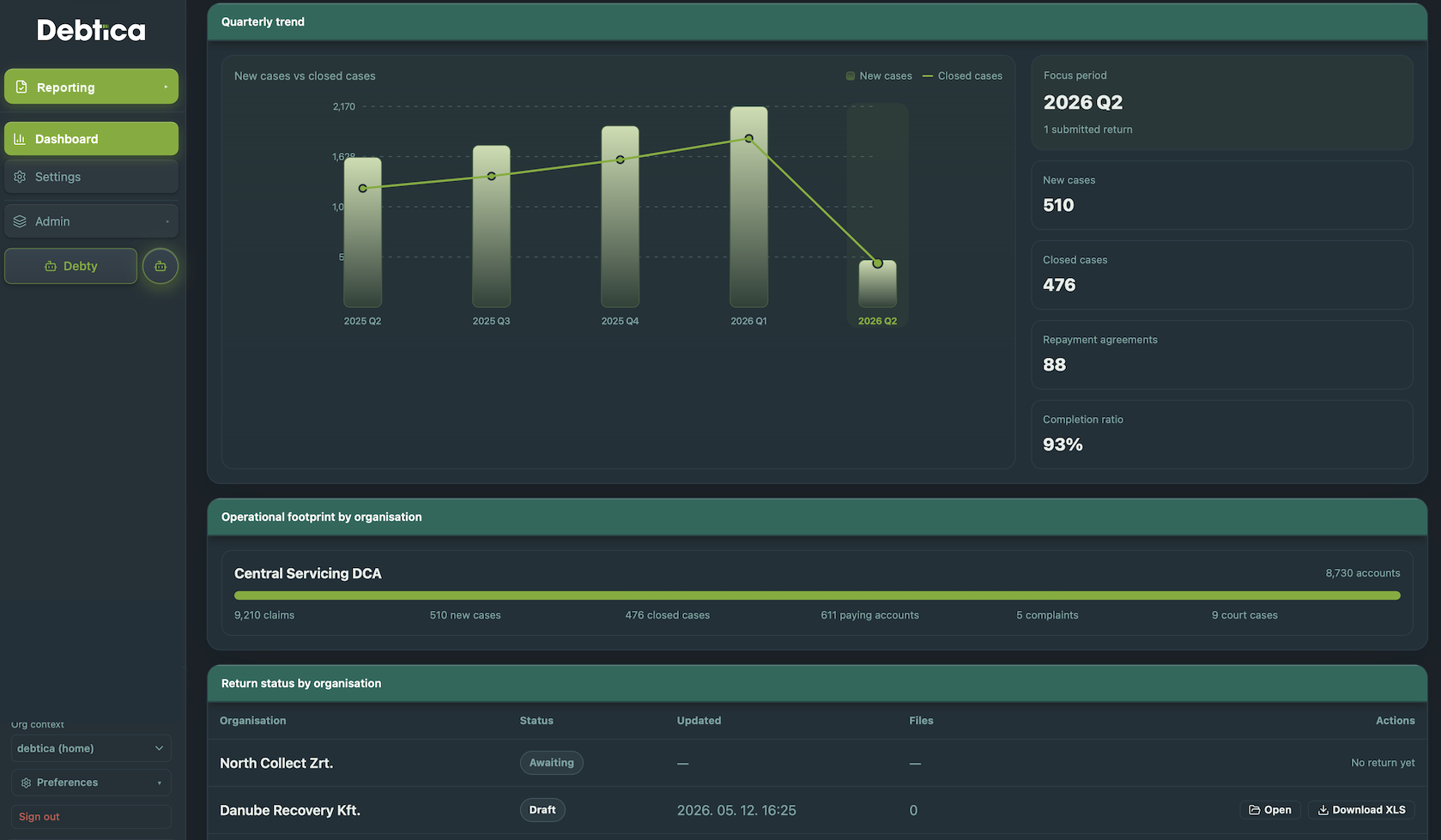
Report keeps recurring reporting periods, forms and organisation submissions under control. Submitters see their open periods and draft status, while receivers can track submissions, reopen items and analyse submitted indicators across organisations.
What it handles
Report in practice
Manage structured reporting flows, recurring obligations, submitter workspaces, receiver review, tracking and analysis in one controlled workspace.
Defined reporting periods, due dates and reusable form structures.
Submitter and receiver views for drafts, submitted returns and reopened items.
Submitted indicator analytics across organisations, periods and operating metrics.
Report Workspace
Control reporting periods, forms, submissions and indicators
Report gives receivers and submitters a structured workspace for recurring reports and assigned submissions. Periods, due dates, form versions, submitted returns, reopened items and indicator analysis stay controlled from requirement setup through review.
Report Periods
Form Templates
Submitter Views
Indicator Analysis
Periods
Defined cycles, due dates and assigned reporting obligations
Forms
Reusable form templates with versioned submission snapshots
Submissions
Draft, submitted, reviewed and reopened submission workflows
Indicators
Comparable metrics across organisations, periods and returns
The problem
Structured reporting becomes risky when forms and follow-up are manual
Recurring reports and assigned returns need clear ownership, stable form definitions, reviewable submissions and comparable indicators. Email chasing and spreadsheet collection make that hard to govern.
Missed obligations
Receivers need to see which organisations have open, late, submitted or reopened returns.
Changing templates
Historical submissions must remain understandable even after templates or requirements evolve.
Limited analytics
Submitted values should support review, comparison and operational insight across periods.
How it works
Four steps from requirement to reviewed return
Report keeps the receiver and submitter perspectives connected while preserving the evidence of each submission.
Define
Set reporting periods, due dates, form templates and requirement assignments.
Prepare
Submitters complete their assigned returns with values and supporting attachments.
Submit
Returns are submitted with a stable version snapshot of the form and captured values.
Review
Receivers track status, reopen returns when needed and analyse submitted indicators.
Report features
Everything your team needs for controlled reporting management
From form setup to indicator analysis, Report replaces manual chasing with a clear, reviewable submitter-to-receiver workflow.
Report Periods
Define reporting cycles, due dates and active obligations for each submitter organisation.
Report Forms
Create reusable forms with structured fields and stable submitted snapshots.
Requirement Assignments
Assign the right reporting obligations to the right organisations.
Submitter Workspace
Give organisations a clear view of drafts, due dates, submitted returns and reopened items.
Receiver Workspace
Track progress, review returns, reopen submissions and monitor completion.
Attachment Evidence
Keep supporting files connected to the submitted return record.
Indicator Analysis
Compare submitted indicators across organisations, forms and periods.
Audit History
Preserve form versions, submitted values and review actions for governance.
Who it is for
Built for organisations managing recurring reporting flows
Associations & Receivers
Collect structured returns and track submission status across many organisations.
Submitter Organisations
Prepare assigned returns with clear deadlines, drafts and reopened item handling.
Compliance Teams
Keep reporting evidence, attachments and review history in one controlled workspace.
Management Teams
Analyse submitted indicators and identify trends across periods.
Operating model
A reporting-management module with shared evidence paths
Report can operate as the focused reporting workspace. When combined with Document, Collection or Migration, it can reuse shared evidence, organisation data and audit controls.
Standalone
Report workspace
Use Report to define forms, assign reporting obligations, collect submissions and analyse indicators.
Evidence and operating context
Add Document, Collection or Migration when reporting workflows need attached files, case context or prepared datasets.
Platform context
Part of the wider Debtica platform
This module is designed to connect with the other Debtica modules through shared data, permissions and audit history.
Get in touch
See Debtica in action
Tell us which module is most relevant for you and we will prepare a walkthrough around your real workflow.
- Module-specific walkthroughs
- SaaS and on-premise options
- Newsletter opt-in inside the form
- Response within one business day
Request a Demo
Share your details and tick Debtica updates if you want product notes as well.
Email is required. Phone is optional.
© 2026 Debtica. All rights reserved.